Find out more about the iMobileIntervals iPhone app here
3.21 released
Submitted by RansomiMobileIntervals 3.21 updates to conform to a recent change in Garmin Connect's login scheme.
ImobileIntervals 3.8 Release: Chromecast workouts to your TV with YouTube video underneath!
Submitted by RansomThis is an exciting release for home trainer users. Now you can use the $30 Chromecast to display your workout on any TV with an HDMI port.
iMobileIntervals integrates with YouTube to provide video content behind the workout. Several default playlists are provided and you can add your own playlists. Individual workouts can have their own video or playlist, set in-app or on the website.
On your TV, overlaid top and bottom on the video, you get:
* interval count, graph, now/next caption, elapsed and interval time
* interval change countdown
* sensor data (hr, pwr, cad, speed)
* normalized power, intensity factor, TSS
Find out more about how to use iMi with Chromecast here.
iMobileIntervals 3.7 Released: ERG file import, open-ended intervals, intervals graph
Submitted by RansomMore love for the WahooFitness KICKR in this release! ERG/MRC files contain data to control the resistance of the KICKR trainer, and while iMobileIntervals.com has had an ERG importer feature for some time, converting ERG/MRC files into iMi workouts in your Personal Workouts library, you can now send ERG and MRC files direct to the app.
The file must have a .erg or .mrc file ending, and conform to the standard or PerfPro ERG format (however distance and slope intervals are not supported).
How to do it:
iMobileIntervals 3.6 released with Strava uploads, iOS 8 and more!
Submitted by RansomIn addition to being built with the iOS 8.1 SDK, iMobileIntervals gets some good tweaks in this edition:
* Support for:
-- Strava uploads
-- Magellan Echo FIT sportswatch
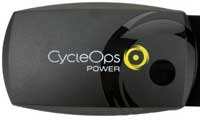
-- CycleOps PowerCal (HR strap that calculates watts)
iMobileIntervals 3.2 released: Magellan Echo and RFLKT+ support, integrated FTP test and more
Submitted by Ransom3.2 is an exciting release for iMobileIntervals. In addition to numerous bug fixes, we have the following new features:
- iOS 7 user interface
- Magellan Echo remote wristwatch display support, featuring:
- Duration, interval/split time, heart rate, distance and pace display
- Current and next interval info scroller
- Upcoming interval info alert with chime
- Tap watch face to get large instant pace and distance *
- Lap generates info alert with average pace and distance for the lap *
- Hard button controls to start/stop/skip songs, start/stop/restart workout, lap or skip interval
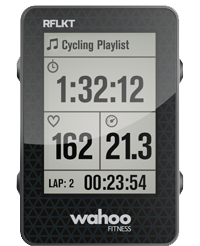
- WahooFitness RFLKT+ remote display support, featuring:
- Accurate elevation readings from barometric altimeter
- Display of elevation and temperature
- Connect ANT+ sensors through the RFLKT+ unit (ANT+ bridge)
- Integrated FTP (Functional Threshold Performance) test. After completing the test interval, the app will compute your FTP power and heart rate and save to settings
- Accessibility improvements for the visually impaired
* When the iPhone is in VoiceOver accessibility mode, lap and screen tap for Echo will speak the data for the visually impaired athlete!
WahooFitness KICKR integration also comes in for some updates, adding the ability to manually dial in an ERG watts when doing an open-ended workout.
About iMi Training Plans
iMi features training plans you can easily build from public or personal workouts, activate and use in the iMi app on a daily basis. Each day's workout is available under "My Planned Workouts", and your workouts are available as an iCal feed. If you belong to an iMi group you can easily share this training plan with group members, and you can also sell it to other users on this website. Have a look at our Demo training plan.
About iMi:
What does iMi do?
- New! ERG/MRC file import via email or TrainingPeaks app
- New! Interval Graph
- New! Open-ended intervals in website workouts
- New! For rowers, display and record your power (via the CycleOps PowerCal HR-based power meter)
- New! Upload your workouts direct to Strava
- Load workouts from your Garmin Connect library or calendar! Includes open-ended interval advance from lap button press or heart rate limit reached.
- Let iMi control the resistance of your Wahoo KICKR trainer (Bluetooth Smart or ANT+) according to interval intensity zone or a specific watts value or percentage or user's functional threshold power (FTP)
- Keep your phone in your pocket and view/control iMi on the Wahoo RFLKT remote display or Magellan Echo/Echo FIT smart watch (Bluetooth Smart only).
- iPhone 6, 5, 4S or iPad 3 users can connect to Bluetooth Smart heart rate monitors, power meters and speed/cadence sensors, and display their workouts on TV using AppleTV 2 and AirPlay.
- With a WahooFitness ANT+ accessory, iMi can function as a cycling computer or runner's watch, displaying power, speed, pace, cadence and heart rate. Suuno HRM is also supported.
- iMi can send live data to a telemetry widget. Embed your own or use the one provided at http://imobileintervals.com/t/[imiusername]
- Use the iMi Facebook app (http://apps.facebook.com/imobileintervals) to post notifications of starting telemetry or workout completion, and look at your and your friends' workout results.
- iMi collects your intervals, splits and data samples and relays them to your imobileintervals, Garmin Connect or TrainingPeaks accounts automatically, or to your desktop using Dropbox.
- iMi works with "Powered by TrainingPeaks" sites too, like Runner's World Personal Trainer, Timex and DigiFit.
- With iMi you can browse your TrainingPeaks calendar, load your TrainingPeaks workouts to your iDevice, run your workout and have your TrainingPeaks workout automatically updated with your results.
- iMi can run locked in your pocket and collect many hours of data.
- iMi works great without biometric sensors too. Uses iPhone GPS to display speed, distance and pace if a stride or speed sensor is not present.
- Power meter users get Intensity Factor, Normalized Power and TSS displayed, as well as 5sec, 10, 20, 30 and 60sec power.
- In addition to the sophisticated workout-building capabilities of the website, the iMi app has in-app workout building and open-ended workouts.
- Create splits on the fly in open-ended workouts.
- Optional voice prompting of the upcoming activity.
- iMi displays your personal target watts and heart rate for the current interval.
- iMi contains a built-in implementation of the ipod music player with which you can:
- Set a default music collection
- Set a music collection for a given workout
- Set per-intensity-zone music collections
- Set the app to auto-start music with the workout
- iMi will automatically "duck" the player volume when it needs to speak.
- Get daily workouts that have been added to a Training Plan on the iMi website. When one or more plans is active, the iDevice will fetch the current day's workouts, and allow "earlier/later" browsing of the plan's workouts.
- Get workouts that are shared among a group. Groups (e.g. coaching group, college team) can be configured by the iMi administrator and group admins designated who can invite users to join.
- iMi also supports posting of your workout results to Twitter and Facebook.
How does iMi work with this website?
iMi can work without the website, but there are many cool features provided here:
- After registering on this site, you can create your own workouts. You may set the workout to public to share with the iMi community.
- An iMi username is required for use of the telemetry feature.
- Your user profile saves your personal aerobic threshold watts and heart rate, and the iMi app will use these values to calculate your target range for each interval where a zone is specified.
- In your device settings app you enter your user/pwd for this site and when launched the IMI app will show your personal and group workouts.
- Create your own training plans of workouts or have a coach/group_admin assign you training plans with workouts that appear on a daily basis in your device.